
Tool: Assign Coordinate System
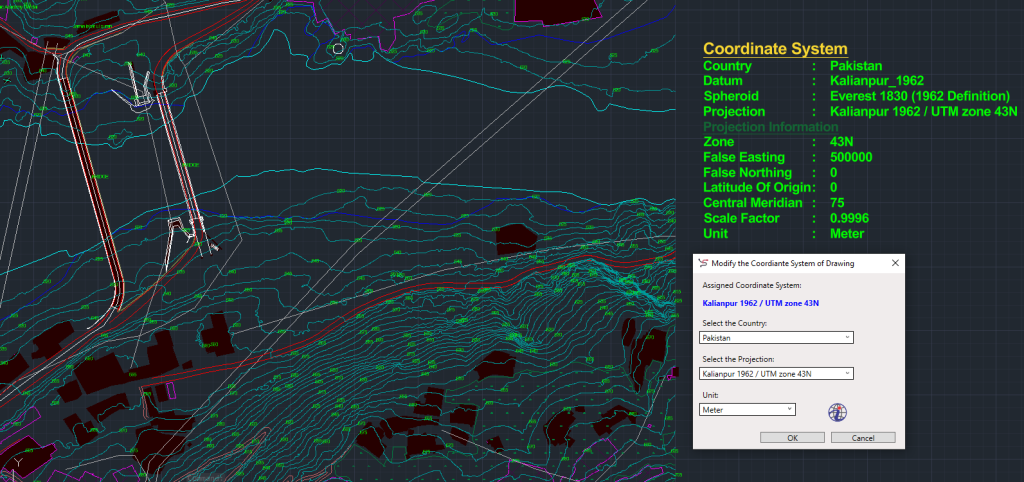
The Assign Coordinate System tool in SPCAD enables users to accurately reference spatial features in CAD drawings. By defining both the reference ellipsoid and projection system, SPCAD ensures all your geospatial data aligns precisely with real-world coordinates.
Whether you’re importing GPS data, exporting KML maps, or transforming vector drawings, assigning the correct coordinate system ensures consistent and reliable spatial accuracy.
Coordinate Systems Overview
A coordinate system serves as the foundation for locating and referencing spatial features on the Earth’s surface. It includes two main components:
Reference Ellipsoid
The reference ellipsoid defines the Earth’s size and shape within a specific region. Examples include:
- WGS84
- Everest (Kallianpur)
Projection System
The projection system mathematically converts the curved surface of the ellipsoid onto a flat plane.
Common examples are:
- Transverse Mercator
- Lambert Conformal Conic (LCC)
Benefits of “Assign Coordinate System” in SPCAD
SPCAD’s “Assign Coordinate System” tool offers several key functionalities, enhancing the software’s versatility and adaptability:
- Import Operations: Facilitates accurate import of KML and GPX files.
- Raster and Vector Export: Enables export of raster data to KMZ, KML, shapefiles, and GPX formats.
- Spatial Transformation: Supports transformation of drawings between coordinate systems.
- QR-Code Integration: Assists in the precise insertion of location-based QR codes into drawings.
- Parcel Annotation: Computes parcel area based on user-specific units.
- LOT Parcels to KML and Shapefile Formats: Facilitates export of LOT parcels to KML and shapefile formats.
Optional Usage In Other Tools
While not mandatory, utilizing a coordinate system can be advantageous in certain applications, such as:
- Data-Driven Pages and Callouts: Establishing a coordinate system enhances functionalities like data-driven pages and callouts, enabling the display of locations using geographic coordinates (i.e., latitude and longitude).
Example Application
In SPCAD, the process of seamlessly converting drawings from their original Universal Transverse Mercator (UTM) or Lambert Conformal Conic (LCC) coordinate systems to KML format is facilitated once the correct coordinate system is assigned. This integration ensures smooth compatibility with geographic coordinate-based formats like KML, offering users enhanced flexibility and usability in managing spatial data.