
The Block Count Tool in SPCAD is an essential feature for CAD professionals. It helps users quantify repeated block elements in a drawing with accuracy and ease.
This tool is especially useful when handling complex designs containing multiple instances of the same block. It allows users to identify and count specific block types instantly.
Why Use the Block Count Tool
The tool becomes valuable in various design scenarios. It is often used in large architectural layouts, electrical schematics, and landscape plans. In these projects, manually counting blocks can be time-consuming and prone to error.
With the Block Count Tool, users can quickly generate accurate block quantities. This process not only improves efficiency but also ensures reliability in project documentation.
How to Use the Block Count Tool
To use the Block Count Tool effectively, you must first ensure that your drawing includes the block objects you want to count.
Here’s a step-by-step guide on how to display block count information using this tool:
- Access the Block Count Tool:
Begin by navigating to the Analysis panel in SPCAD. Under the ‘Count’ dropdown menu, select the “Block Count” option. Alternatively, you can activate the tool by typing BCNT_SP into the command prompt. - Select the Blocks:
Once the tool is activated, the cursor will prompt you to select the blocks you want to count. Carefully select the blocks within your drawing that you wish to include in the count. - Confirm the Selection:
After selecting the blocks, press Enter or the Spacebar to confirm your selection. This action tells the tool to proceed with counting the selected blocks. - Define the Table Extent:
Next, you will need to define the extent of the table that will display the block count information. Use the selection window to specify the area where you want the table to appear in your drawing.
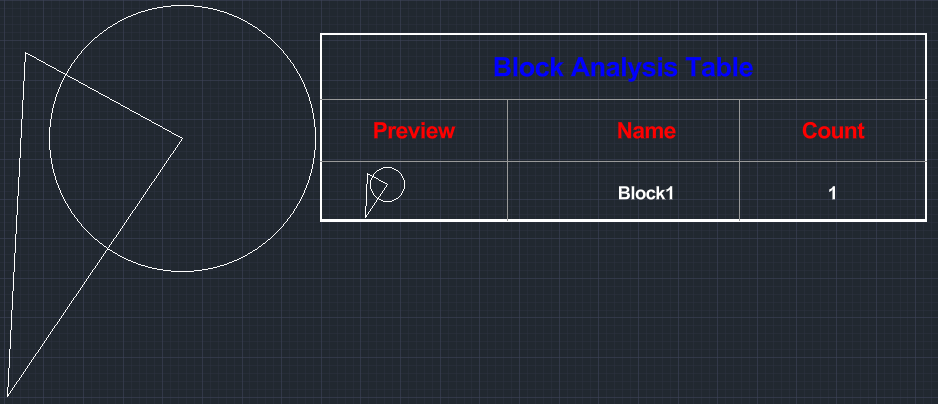
Review the Results in the Block Count Tool:
Once you complete these steps, a table will be generated, displaying the block count for each selected object. The table includes the block preview, block name, and the quantity of each block within the selected objects. This detailed information is invaluable for project management, as it provides a clear and organized view of how many instances of each block exist within your drawing.
Using the Block Count Tool simplifies the process of managing and quantifying blocks, making your CAD workflow more efficient and accurate.
For more detailed information on SPCAD tools, visit our website or YouTube channel.