
Overview
The Export section in the Point Group Manager allows you to save and share your point group data in a variety of industry-standard formats. Whether you’re collaborating with GIS teams, delivering survey data to clients, or archiving your work, this section provides flexible options for exporting the contents of any selected point group.
The export functionality supports the following formats:
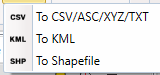
To CSV / ASC / XYZ / TXT
This option allows you to export point data as plain text files in formats commonly used for data exchange and analysis:
- CSV (Comma-Separated Values)
- ASC (ASCII grid-compatible format)
- XYZ (for 3D point clouds)
- TXT (custom-delimited plain text)
This option is ideal for survey reports, GIS import, or use in spreadsheets.
To KML
This option generates a KML (Keyhole Markup Language) file, which is used by tools like Google Earth and Google Maps. Each point is exported as a placemark, and attributes such as elevation and description can be included as metadata. KML export makes it easy to visualize and share your data in geographic contexts with non-CAD users.
To Shapefile
Export your point group as an ESRI Shapefile (SHP), the standard format for use in GIS applications like QGIS or ArcGIS. The exported shapefile includes a corresponding DBF table with attribute data. This is the preferred format for professional GIS workflows or integration with spatial databases.
With the Export section, you can seamlessly transition from CAD to external platforms, ensuring that your point group data remains portable, interpretable, and ready for use across multiple disciplines and systems.