
Converting 2D Curves to Polylines in a CAD Environment
The Circle/Arc/Spline to Polyline tool allows you to efficiently convert 2D curves, such as arcs, splines, and circles, into 2D polyline objects. This conversion is particularly essential when you need to simplify complex curves into more manageable and editable geometric shapes. Consequently, this enhancement improves your ability to modify and work with designs in a CAD environment.
Why You Need It?
In CAD design, working with complex curves like circles, arcs, and splines can sometimes be cumbersome. However, converting these curves into polylines simplifies your workflow by transforming intricate curves into straight-line segments. This process becomes particularly useful when you need to modify, edit, or integrate these shapes with other design elements. Additionally, by converting curves into polylines, you ensure that your designs remain versatile and easier to manage, which is crucial for maintaining precision and efficiency in technical projects.
Steps to Convert 2D Curves to Polylines
- Access the Tool
First, click on Convert Circle/Arc/Spline to Polyline from the dropdown of Create Features. Alternatively, you can type CONPL_SP in the command prompt to access the tool directly. This step sets up the tool for the conversion process. - Select the Curves to Convert
Next, select the 2D curve you want to convert. This can be a circle, spline, or arc. By selecting the curve, you specify which geometric shape you want to transform into a polyline. - Confirm the Selection
After selecting the curve, press ENTER or the Spacebar to confirm your selection. This action initiates the conversion process, turning your chosen curve into a polyline object. - Verify the Conversion
To confirm that the conversion has been successful, first, check the properties of the converted object in the Properties palette. This step not only ensures that the conversion meets your expectations but also verifies that the new polyline accurately represents the original curve.
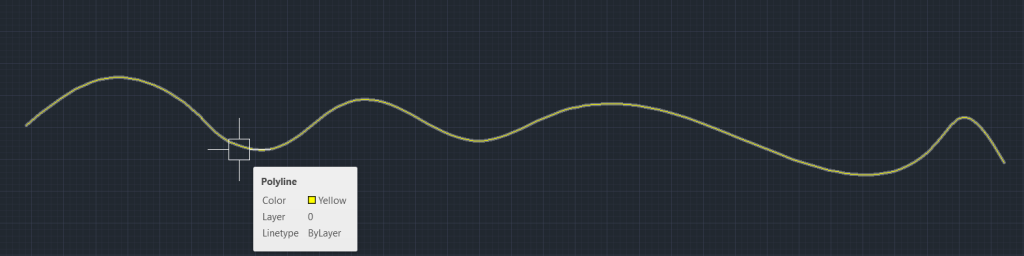
By following these steps, you efficiently convert 2D curves into polylines, simplifying your design tasks and improving your workflow in CAD. The Circle/Arc/Spline to Polyline tool enhances your ability to manage and edit complex curves, ensuring precision and ease in your technical projects.