
Convex Hull in CAD: Why It Matters
The convex hull in CAD is a vital tool for defining the outermost boundary that encloses a group of points. It creates the smallest possible polygon that contains all the selected points, which is essential in fields like urban planning, geospatial analysis, and land management. Using the convex hull helps engineers and designers quickly identify the limits of spatial datasets for accurate mapping and analysis.
Understanding the Convex Hull Concept
To visualize the idea, imagine several points as nails fixed into a board. If you stretch a rubber band around the outermost nails, it forms a tight boundary around them. That boundary represents the convex hull—the shortest perimeter enclosing all points.
Preparing for Convex Hull Creation
Before generating a convex hull, ensure that the points are imported into your DWG file. The convex hull tool will only create a boundary around existing points. Proper data preparation ensures the accuracy of the resulting polygon.
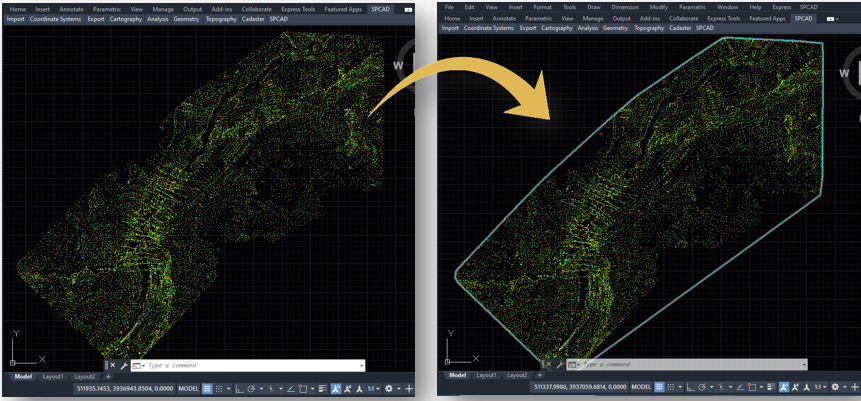
Steps to Use the Convex Hull Tool
- Access the Tool
First, go to the ‘Draw’ dropdown in the Analysis panel and select “Convex Hull”. Alternatively, you can type CNH_SP in the command prompt to access the tool directly. - Select Points
Next, select the points around which you want your convex hull to be created. Make sure to select all relevant points to ensure the hull accurately encloses the desired area. - Create Convex Hull
After selecting the points, press Enter. The convex hull will then be created, enclosing the selected points with the shortest possible perimeter.
Tips for Effective Use
- Ensure Proper Point Selection
Select all the points you want the convex hull to enclose. - Check Point Placement
Verify that your points sit correctly in the DWG before creating the convex hull. This step keeps the resulting boundary accurate and meaningful.
Using the convex hull tool in SPCAD simplifies the process of defining boundaries around a set of points. This tool is particularly beneficial in scenarios where you need to identify the outer limits of a dataset quickly and efficiently. By providing a clear and concise boundary, the convex hull tool enhances your ability to analyze and manage spatial data within your CAD drawings.