
Export Blocks to CSV Tool SPCAD: Streamline Your Data Management
The Export Blocks to CSV Tool in SPCAD serves as an essential feature for exporting CAD point blocks into CSV files. As a result, this tool simplifies the data management process by converting your blocks into a widely accessible format. Because CSV files are compatible with spreadsheet programs like Microsoft Excel and Google Spreadsheets, you can easily manage and analyze your data. Consequently, this tool is indispensable for projects that require precise data management and exportation.

Why Use the Export Blocks to CSV Tool?
First, exporting CAD blocks to a CSV file ensures that your data remains organized and accessible. Moreover, the CSV format facilitates easy data sharing and integration with other applications. Additionally, because CSV files are simple to edit, they allow for quick updates and modifications. Furthermore, the ability to export Cartesian coordinates (x, y, and z), point ID (PID), code, and elevation ensures that all critical data is captured and stored efficiently. This process significantly enhances your project’s overall accuracy and efficiency, leading to better results.
How to Export Blocks to CSV
Accessing the Tool
- First, click the BCSV icon in the Export panel. Alternatively, type BCSV_SP in the command line.
- Selecting the Blocks
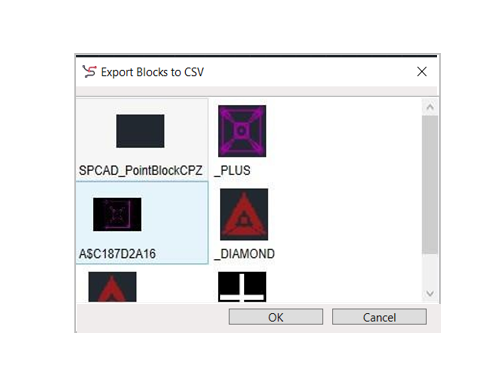
- Next, once the dialogue box appears, select the blocks you wish to export. After selecting the blocks, press ENTER or Spacebar.
Saving the CSV File
Then, a file selection box will appear. At this point, choose your desired location to save the CSV file. Finally, click Save to complete the export process.
Benefits of Exporting Blocks to CSV
Exporting blocks to a CSV file offers numerous benefits. First, it ensures that your data is easily accessible and editable. Moreover, it simplifies the process of integrating CAD data with other software applications. Additionally, the tool enhances project accuracy by ensuring that all essential data points are exported and stored correctly. Consequently, the Export Blocks to CSV Tool in SPCAD is a valuable asset for anyone looking to streamline their data management processes.